Centercode Release Notes

What's New

The latest updates and improvements to the Centercode platform.

Things are starting to heat up, and I'm not just talking about the weather! Centercode's June release includes two incredible new features that you're sure to love! Say goodbye to the days of burner email addresses and spinning up test accounts to preview your onboarding process, and make way for the brand new User experience preview tool. Hot off the GoEarly presses, this powerful new tool lets you create, test as, and remove a temporary user account in one seamless flow!

And headed to our GoEarly users we've got a game-changing new way to edit your filters and views in the data engine. This is one you won't want to wait for, so get signed up now!

New Features

Verify your setup from any angle!

We’re excited to announce the launch of User Experience Preview, a brand new Centercode feature designed to give you complete visibility into any user’s experience. For example, admins can now seamlessly step into the role of a tester, including navigating the project, completing activities, and viewing content exactly as testers would. When you’re done previewing, the temporary tester account is automatically cleaned up to keep your environment tidy. This powerful update ensures your projects are polished, intuitive, and perfectly aligned with your expectations before real participants ever set foot in the door.

You can access the User experience preview via the User management menu, as well as a few other convenient areas throughout the platform where you might want to preview a user's journey through the platform, including areas such as Recruitments and Notice management.

Designed with the same familiar look and feel as our quick invite UI, the User experience preview makes it fast and intuitive to preview exactly what your testers will see. Simply select the recruitment path or combination of teams you would like to preview (including or excluding the notice process) and Centercode will instantly generate a temporary user account to preview that experience!

And voila! You'll be temporarily previewing an account with the specified level of access. View (and even complete!) the activities, surveys, content, and feedback types as if you were a user. When you're done the system will automatically clean up any changes you made!

This powerful new tool helps ensure your project is set up exactly as intended before inviting testers. It lets you catch visibility issues, broken links, or confusing flows early, reducing tester friction and support needs. Or use it to quickly share a real, interactive preview with stakeholders, so they can see exactly how testers will engage with your project. By stepping into the tester’s shoes, you can confidently deliver a polished, intuitive experience from day one!

Centercode GoEarly features

View/Filter UI Revamp

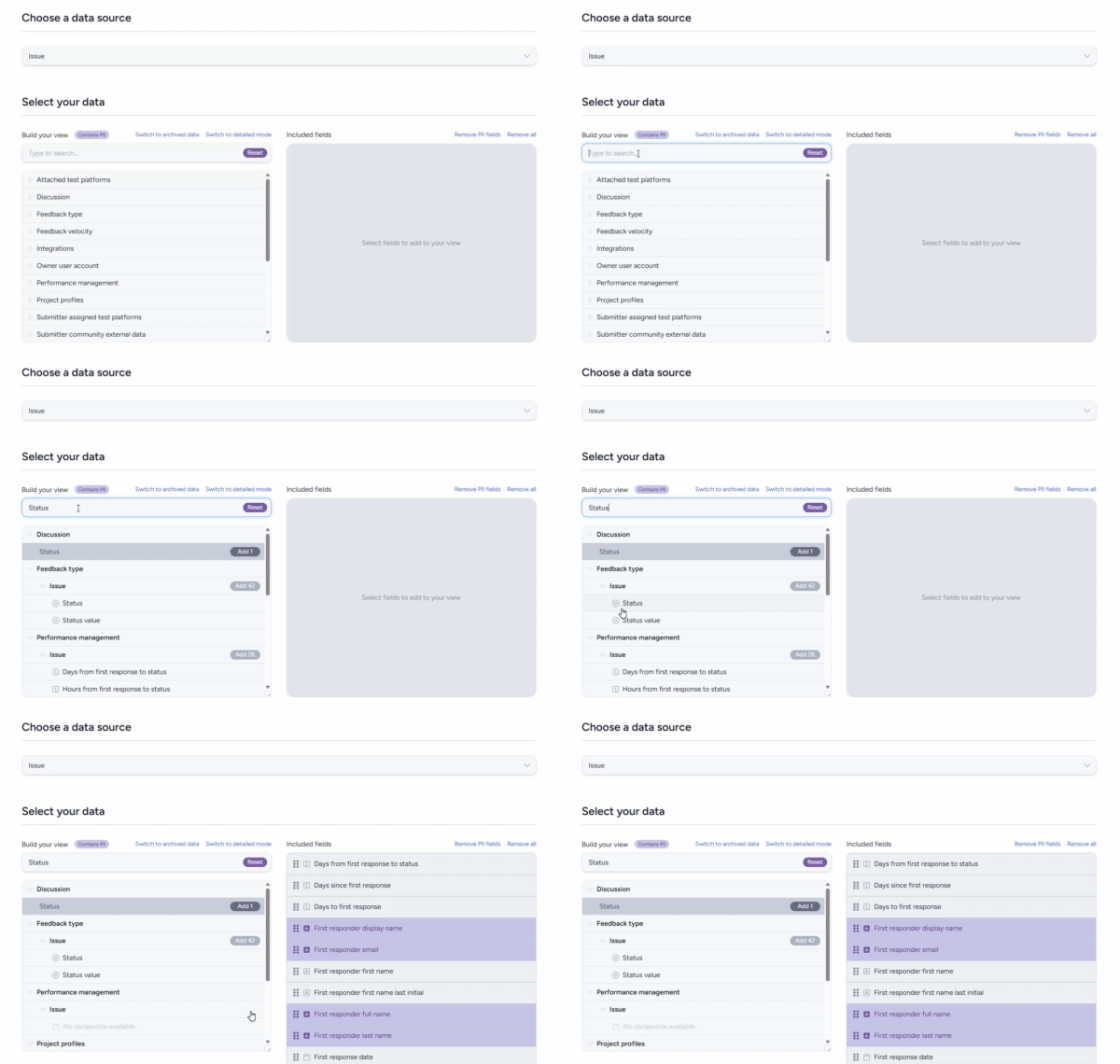
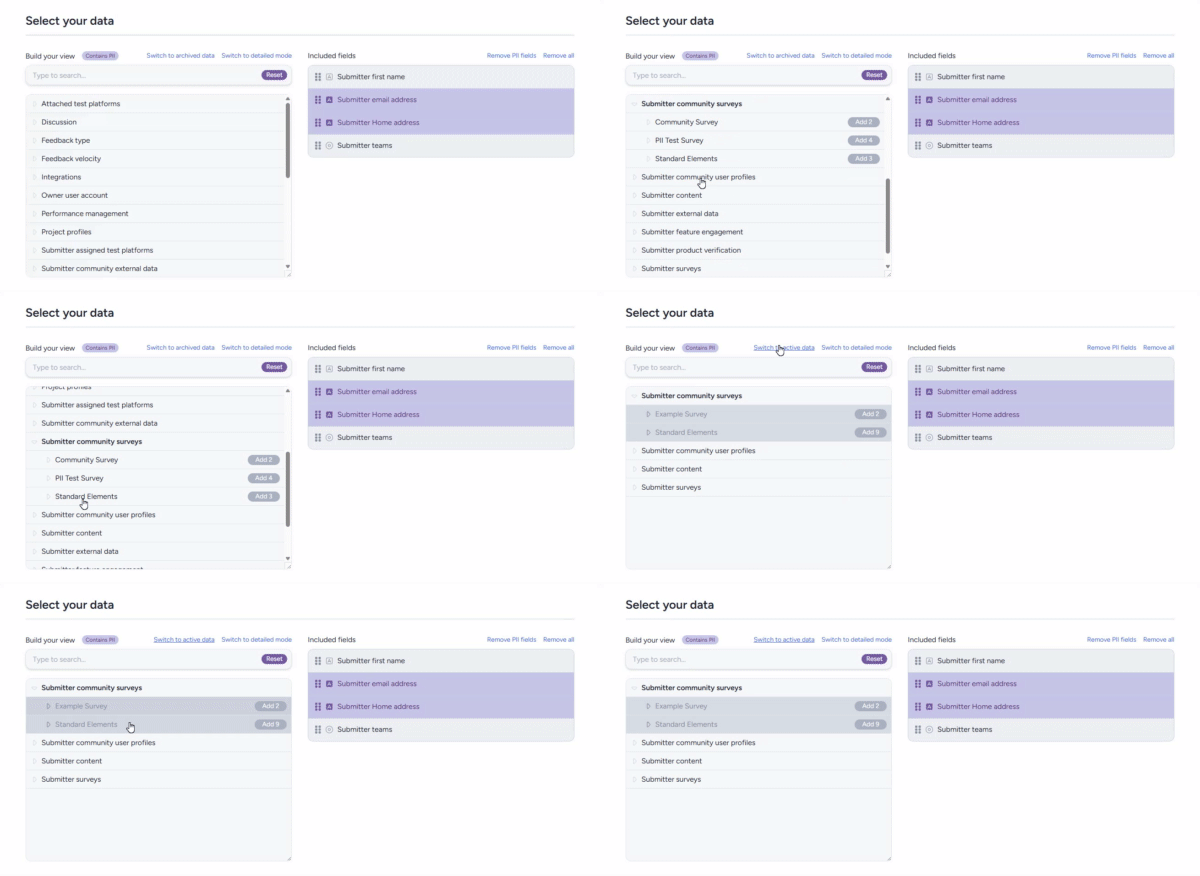
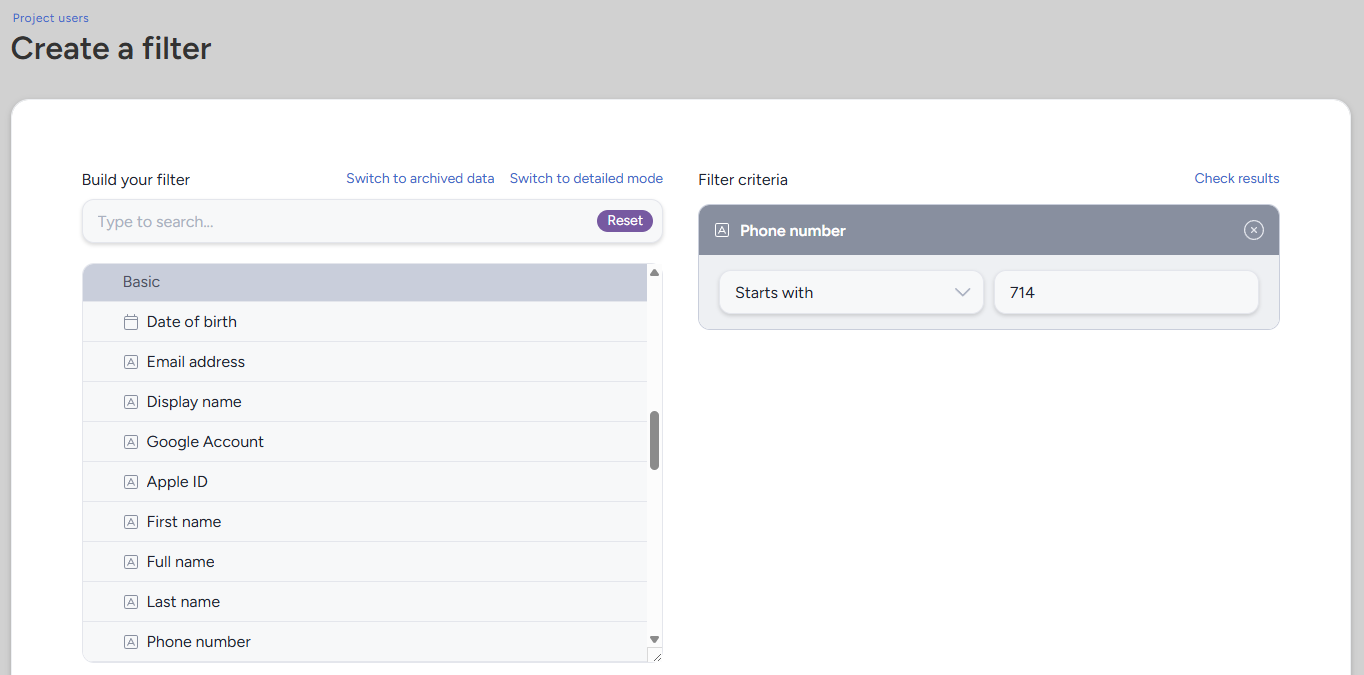
Hold on to your hats, this is another big one! In this month's GoEarly release we're rolling out a major revamp of the Data Engine interface to streamline how you explore and interact with any data in your system. Anywhere in the platform where you're working with filters/views (reports, user/feedback lists, etc.) is getting a big upgrade! Here's just a few examples of what you've got to look forward to!

Modern Navigation & Search
We’ve modernized the Data Engine UX to support both structured hierarchical browsing and a lightning-fast, scope-wide search so you can find what you need, your way.

Archived Data Toggle
Need to reference old data? Now you can include archived items in your filters with a simple toggle, making it easy to surface retired fields when they’re still relevant.

Clear PII Visibility & Controls
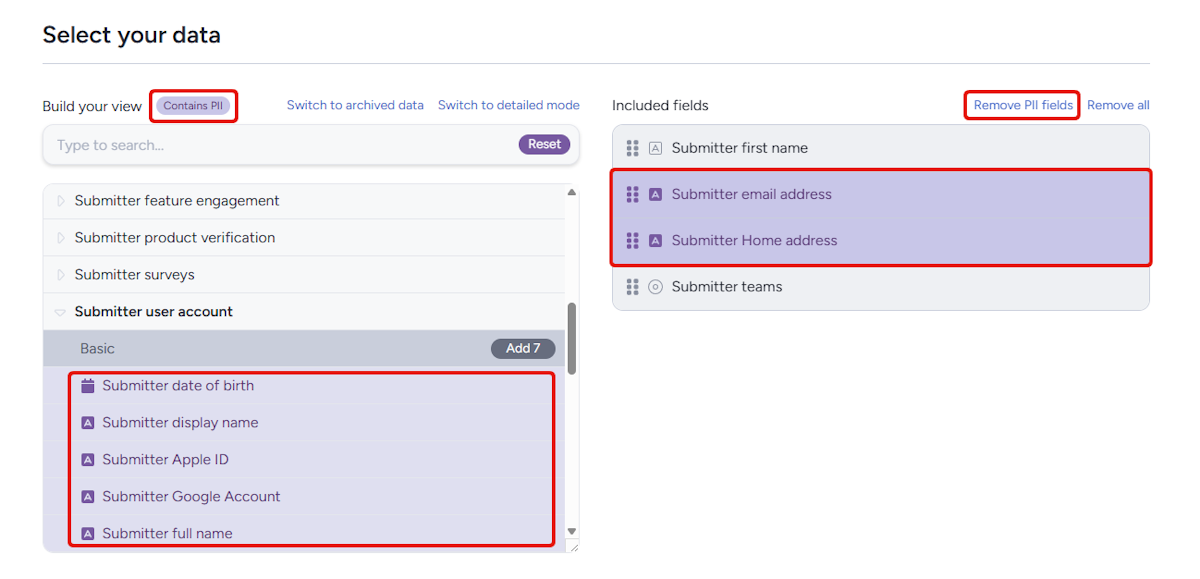
Personally Identifiable Information (PII) is now clearly flagged throughout the engine. You're now able to easily remove all PII from your selected view elements with the click of a button, giving you a fast easy way to convert an existing report into one suitable for presentation! We’ve also added community-level settings to govern how PII can be used, giving you better control and compliance confidence.

Fixes

Data Engine & Custom Reports

  • Spreadsheets containing more than 64000 records will no longer error when using "Export as spreadsheet" in reporting.

Delta Dashboards

  • The Delta Huddle dashboard will now better handle cases of heavy data load.

Onboarding/Recruiting

  • Corrected a scenario where the default community recruitment having expired or reached a user limit would prevent logins.

Test Planning

  • Quick modifications of features in test planning will now properly allow 60 characters to match standard modify.
Fixes

Content & Resources

  • Media will now be functional on certain servers hosted outside of the US.
  • Maximized Centercode content editors will now allow toolbar functions.

Miscellaneous

  • Forum print view will now display correctly when using project full name setting.
Fixes

Localization & Strings

  • Corrected a few localized strings in test planning to no longer impact page function.

Data Engine & Custom Reports

  • Phase name removed for non-regression activity item data results.
Fixes

Data Engine & Custom Reports

  • Webhooks using timestamp dynamic tags will now send correct data.

Notices

  • An individual notice reset issue was corrected.

This month we've got some seriously a-May-zing (last one I swear) user-requested updates and features on offer! This release introduces new options for time and timestamp formats, along with a powerful way to preview your tester-facing experience before going live. Together, these enhancements streamline your workflow and ensure that every detail — from timing to communication — is dialed in to perfection. And as always, to get a taste of everything this release has to offer, join our GoEarly program now!

New Features

24 Hr and Alternative Timestamp Formats!

First, by popular demand, expanded time format options are here. Users can now choose to display timestamps in a 24-hour format, alongside new alternative timestamp formats in areas of the platform where there might have been been ambiguity (ie mm/dd/yyyy can be swapped for dd/mm/yyyy, but Jan 3rd will remain Jan 3rd.) Whether you’re aligning with international standards or just prefer a cleaner clock, your users will have the flexibility to match their style and needs, and questions of whether you mean January 2nd or February 1st will be a thing of the past!

Centercode GoEarly features

User Experience Preview!

Next up for our GoEarly participants, and by even more popular demand, we're introducing our brand-new User Experience Preview function! This tool allows admins to test and review the tester-facing experience — from welcome messages in your notice chain to access to individual resources — before they're live. It’s the perfect way to ensure that every communication lands exactly how you intend, giving you total confidence in your audience’s journey from day one. This brand new tool lets you fully experience your project as a user, including (or skipping!) the notice chain, and any resources, activities, or feedback forms a user on the teams you select would have access to. And once you're finished, the tool will clean up after you, removing the test user and any notice, survey, or activity completions you tested!

Fixes

Data Engine & Custom Reports

  • Corrected an issue related to dates being displayed incorrectly in emailed report spreadsheets
Fixes

Data Engine & Custom Reports

  • Impressively long spreadsheets exported as XLSX will no longer be erroneously truncated

It's April, and that means it's time for another Centercode release! And the theme of this month's release... is time! We've got a couple handy new date/time/scheduling related features and improvements for you this month that are sure to help you get your tests on track and running like clockwork! As always, half of the fun is seeing these new features and improvements early via our GoEarly program, and it's always the right time to sign up and get your own test implementation up and running, so sign up now!

Improvements

Set it and forget it with "Once" and "Ending on" scheduling improvements!

We've got some brand-new (and user requested!) functionality added to our macro and distribution scheduling options! Sometimes you might not want a scheduled macro or report distribution to run forever, or you might want to schedule a single distribution or event in the future, so we've added the "Once" and "Ending on" options to our scheduling system. Know when your project is set to end, and won't need reports distributed after that date? Set it and forget it! Got an email you want to go out on a specific day in the future? Create a scheduled macro set to "once" and don't worry about marking your calendar to send it later! Setting your test up for success from the get-go is now easier than ever before!

Centercode GoEarly features

In your own good time!

This month's GoEarly features also bring a few new date and time-related options to the table, with the focus being on providing more options for HOW date and time are presented! We know many of you have testers around the globe, and they might want to set the date and time display options to a format they're more familiar with (which can help avoid errors when using the date/time selection widget!). You'll now be able to use a 24h clock, as well as have a few different date presentation options (DD/MM/YYYY, MM/DD/YYYY, etc). Eager to get your hands on these changes to see how they work? There's no time like the present, get signed up for GoEarly now!

Fixes

Centercode Mobile App

  • An improvement to the mobile application was made to include a sorting drop-down on feedback lists.
Improvements

Improved Mobile Desktop experience!

  • Improved the mobile Feedback list with sorting drop-down options menu from desktop view!
Fixes

Data Engine & Custom Reporting

  • Corrections to Feature CDE data viewed or unengaged users.
Fixes

Data Engine & Custom Reports

  • Resolved issue related to features moved to new phase using "Continue testing" showing empty data
Fixes

Data Engine & Custom Reports

  • New User feature CDE data added for Project user filter/view use.

Miscellaneous

  • Project email "from name" issue when using "community name" in email templates was corrected.

Happy early St. Patrick's day, PiDay(FriDay), and my personal favorite, MAR10 (and good luck in your March Madness pools!) There's a lot to celebrate this month, and Centercode is joining the festivities with a release loaded with new features and improvements! This month we've got some new functionality for existing tools, and a whole host of new data columns for our reporting engine (many of them sourced from your improvement requests!) that allow you to pull data from the platform in all new ways! And this month's GoEarly release keeps the data engine fun going with some brand new automation triggers to get your report and macro automations firing just the way you want. And as always, if you're not already participating in our GoEarly program, get signed up now to get in on the fun!

New Features

Centercode Replays Media Download!

First up we've got a brand new way to access the data collected via your Centercode feature media capture tools. We've added the ability to download your Centercode tester replays to share with outside stakeholders. Videos can be downloaded a la carte, or in groups based on the filters and tags you select! Get all that tasty video data you've collected in Centercode out to the people who need to see it!

Improvements

New Data Columns!

Speaking of tasty data, we've got a few more items to add to the menu! We've got a whole host of new (and a few clarified/reorganized) data points for your reporting and integration needs. Based on your feedback, we've added the ability to report on regression features by individual phase they were used in, as well as a batch of integration-friendly new columns including Project key and Project settings fields!

Centercode GoEarly features

Once/Ending-on Automation Triggers!

This month's GoEarly release contains a new set of automation triggers developed based on your requests! We've added a new refresh interval (once), as well as the ability to set an end date for any of the other refresh intervals. This new functionality is available anywhere scheduled automation exists (including report refreshes, and scheduled macros.) Get signed up for GoEarly and check out these new features on a test implementation of your very own!

Fixes

Onboarding/Recruiting

  • Corrected an issue with opportunity/landing page body text formatting on Delta/Impact and Pro editions.

Roses are red, violets are blue, and this month's Centercode release has too much good stuff to feasibly fit into the rest of that rhyming scheme! While the poem might be a bust, Ted AI is going to pick up the slack and deliver a heart-shaped box full of handy new data analysis features that you're sure to enjoy. And that's not all! We've got a new feature bouquet filled to bursting ready for our GoEarly testers this month, with media replay download functionality and a host of new data engine items. Not signed up for our GoEarly program yet? There's no time like the present, sign up now!

New Features

Ted AI is ready for your date(a)!

Ted AI's (totally platonic) love language is Acts of Service, and he is here to lend a helping hand with another addition to our premium AI tool suite, AI Data Analysis! This brand-new reporting element style will quickly scan through the data you provide and give you a quick, easy-to-digest summary of your data. Use one of the pre-set options for near-instantaneous data analysis, or provide Ted AI a set of custom instructions for robust analysis tasks like sentiment analysis or trend identification! If AI data analysis strikes your fancy but Ted AI isn’t part of your repertoire, check in with your Centercode success manager to find out how to access our premium AI features!

Centercode GoEarly features

More GoEarly features than you can shake a long-stemmed rose at!

This month's GoEarly release has a jumbo box of chocolates worth of new features and enhancements for your testing pleasure (and no surprise coconut filling, bleh). First up we've got some brand-new functionality for our media replay toolset to allow you to download your Centercode tester replays to share with outside stakeholders. Additionally, we've got a whole host of new data columns for our reporting engine (many of them sourced from your improvement requests!) that allow you to pull data from the platform in all new ways! Don't miss all the fun, get signed up for GoEarly and check out these new features on a test implementation of your very own!

Fixes

Data Engine & Custom Reports

  • A scenario where a report element containing a distinct filter could be lost on modify was corrected.

Miscellaneous

  • The community "Access User Details" role will allow associated users to view additional details within projects as internal (non-admin) users.

We're starting the year off with a refreshed design to enhance your testing experience! Centercode's January release focuses on visual and UI changes designed to bring you and your users a cleaner, more modern interface that improves usability, improves the use of screen space, and highlights the features that keep your tests moving. We've revamped the look of multiple areas of the platform, as well as made a few site-wide layout and UI changes that you're sure to love!

Improvements

Keep those New Years (screen) resolutions!

The first changes you'll probably notice (especially if you're on a wide monitor!) are the adjustments we've made to the global UI to better use your available screen space. We've tweaked various page widths across the site to improve visual consistency and better utilize existing screen real estate!

Along those lines, we've made some updates to top headers on many pages. In general, top headers will no longer be sticky, which will save screen space when scrolling around pages at lower resolutions. Additionally, top headers and header buttons will now rest on top of your background and will share visual theme color choices with your existing background text options, so as long as you've got those set up appropriately no adjustments should be necessary.

These changes, in addition to some color and spacing adjustments, are designed to keep your site looking readable and consistent across a much wider range of screen resolutions!

No place like (Project) Home!

Next up we've got some exciting changes coming to your project home pages! We've made a few tweaks to both the look and layout of your project home pages designed to improve test flow, and help you get important information in front of your testers. The first change you'll notice is that now any content you have set to display on the project home will appear at the top of the page, with the feedback buttons now appearing after any custom content, ensuring that the first thing your users see is any important test information you want to get out to them!

Additionally, we've given our feedback buttons a more compact modern design, while maintaining all the same viewing, submitting, and informative capabilities.

One last change that is not specific to the project home (but IS in this screenshot!) is the addition of a tester-facing "Highly confidential project" warning in the menu bar for any of your projects set to "Private", to provide testers with a constant reminder of their non-disclosure and to keep project info confidential.

Feedback list changes!

And finally, we've made some big changes to the layout of our feedback list, presenting all of the same handy information rearranged for visual clarity and readability!

First on the list (and farthest to the left!) is an update to the vote/score widget. Both the admin and tester-facing versions have been given a facelift to improve their visual clarity, and the admin-facing version of this new design places a larger emphasis on the impact score of the ticket.

Next up, we've made some adjustments to the Feedback title area and how that information is presented. Both the "archived" and "blocked" icons will now appear to the left of the title, as well as archived ticket titles now appearing in grey, to help you visually determine which tickets need immediate action (or have already been acted on). Additionally, we've adjusted the styling for how statuses are presented, now giving them a visually distinct foreground color (but no background color), to reduce clutter in the title bar while still presenting all the same visual information you're used to seeing.

Lastly, we've moved the ticket submitter avatar to the right side of the bar, to keep it grouped with the other user-focused information (such as total replies and last reply.)

Fixes

Data Engine & Custom Reports

  • Charts have been corrected in generated report PDF & PNG files.

It’s that time of year when twinkling lights go up, cookies are in the oven, and we’re gathering with friends and family to celebrate the joy of the season. And what would the holiday season be without a few new toys to play with? Well, Centercode has you covered! Say hello to Ted AI survey generation, a brand new toy in Ted AI's toolbelt to make creating surveys as easy as pie (or fruitcake, if that’s your thing). This marks the first of Ted AI's premium features (with more to come, read below!), and if you like what you see there's no time like the present to get on board!

And like the industrious little elf that he is, Ted AI has even more surprises in store for our GoEarly participants! Get a sneak peek at the next upcoming Ted AI feature, AI Data Analysis, and let us know what additional features and functionality you'd like to see before release! Click here to sign up now!

New Features

Let Ted AI build your surveys while you enjoy(?) the eggnog**!**

The star on top of this holiday release is Ted AI's brand-new survey creation capability! Let Ted AI do the heavy lifting of creating your survey while you focus on consuming a (frankly unhealthy) amount of festively shaped cookies. Or, if you know what you want to ask but aren’t sure how to ask it, the same functionality can be used to generate that perfect individual question. Similar to AI Test Plan generation, AI survey creation leverages a selection of your basic product info, existing product documentation, and/or a set of custom instructions to create a survey tailored to your needs in an instant!

Here's an example of generating a full survey:

Navigate to the survey management section (at the community or project level) and start a new survey. Choose the “Help Me” option to unlock Ted AI’s assistance.

Next, pick a survey objective—think of it as writing Ted AI’s wishlist! Objectives help guide the questions he generates to align with your goals. Answer a few prompts to let Ted AI know the sort of data you're looking for, then, sprinkle in some additional details to give Ted more context like project details, product files, and any custom instructions you'd like Ted AI to consider.

Once you hit submit, Ted AI will use a little Christmas (or other seasonally appropriate holiday) magic to whip up a complete survey in just moments!

After that, all that is left is to hit the "Review my survey" button to go over the result, where you can review, edit, and publish the survey!

Ted AI takes the stress out of survey creation.Plus, with expertly crafted questions tailored to your goals, you’ll collect better feedback faster than ever before!

Centercode GoEarly features

GoEarly AI Data Analysis!

That Naughty or Nice list is getting out of hand, and we thought Santa could use a second set of eyes on it. This month's GoEarly release features another Ted AI feature, AI data analysis, that will make sorting through and summarizing large amounts of data a snap! This brand new reporting element style will quickly scan through the data you provide and give you a quick, easy-to-digest summary of your data! Sign up now to get your hands on this feature early!

GoEarly Interface Updates

Alongside the upcoming AI data analysis feature, we’re also delivering some significant updates to the platform’s interface, which include a new streamlined look for multiple prominent tester-facing areas of the platform, including the project home and simple feedback lists!

Fixes

Localization & Strings

  • A string change was made for a message in the test plan archive.
  • A couple of additional small string adjustments were made in test planning and reporting.
Fixes

User Interface & Experience

  • An access warning UI was corrected related to Test Platforms on Feedback being modified.

Localization & Strings

  • Email from name sourced from Community or Projects containing an "&" no longer deliver as &Amp; in the from name.